WeChat Pay HK Verification in 3 Steps: 2026 Mainland Payment Guide

目錄
- 1. WeChat Pay Mainland
- 1.1 What's New: Link an International Credit Card
- 1.2 How to Link a Hong Kong Credit Card
- 2. WeChat Pay HK
- 2.1 Two-Way Cross-Border Payments
- 2.2 How to Activate and Set Up WeChat Pay HK
- WeChat Pay HK Identity Verification
- How to Top Up WeChat Pay HK
- WeChat Pay HK Fee Guide
- Additional Notes
- Four Reasons to Use WeChat Pay HK
- 1. Simple and quick — pay anytime
- 2. Wide coverage and a huge merchant network
- 3. Discounts and offers all year round
- 4. Bank-grade security you can rely on
- WeChat Pay HK's Most Popular Features
- 1. Show your payment code to pay in seconds
- 2. Scan a QR code for instant payment
- 3. Pay your bills from home
- 4. E-Red Packets: the fun way to give
- 5. Instant FPS transfers, free of charge
- 6. Shop online to your heart's content
展示更多
Travel to mainland China and you will find that many shops no longer accept cash, yet without a mainland bank account, paying by phone can be a real hassle for Hong Kong travellers. That changed when WeChat Pay HK introduced two-way cross-border payments, letting Hong Kong residents pay at designated merchants across the mainland. The service has just been upgraded again: choose WeChat Pay HK at checkout in the Trip.com app and save up to HK$440. Want to know how to complete WeChat Pay HK identity verification in 3 steps? Read on to unlock the full features of WeChat Pay Mainland and WeChat Pay HK.

WeChat Pay HK has widened its cross-border coverage further. Individual small businesses on the mainland can now accept Hong Kong dollars automatically, with no application or system upgrade needed on their side.
WeChat Pay HK now reaches every city in mainland China, so Hong Kong residents can shop in Hong Kong dollars at tens of millions of merchants. It also plugs into public transport in many popular mainland cities: alongside apps such as Shenzhen Metro, Didi Chuxing and Amap (Gaode Maps), it now covers the bus and metro systems of Shanghai, Hangzhou, Xiamen, Chongqing, Chengdu, Wuhan and Xi'an. Just scan the merchant's QR code in WeChat, enter the amount in RMB, and your payment is converted to Hong Kong dollars automatically.
*Important note: Hong Kong users must first complete Hong Kong ID verification on WeChat Pay HK before they can pay small merchants on the mainland, including taxis in Shenzhen.



As travel and business between China and the rest of the world grow, Hong Kong residents and overseas travellers no longer need a mainland bank account. Link an international credit card (Mastercard or Visa, for example) to activate a WeChat Pay Mainland account, and you can pay directly at any merchant nationwide that accepts WeChat Pay.
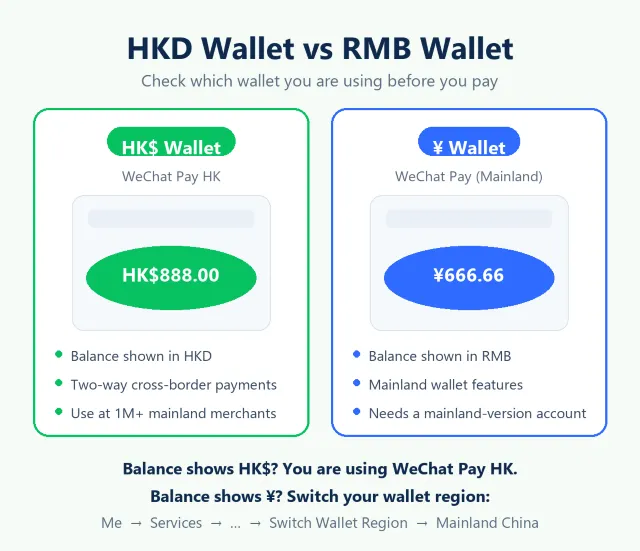
| Steps to link a Hong Kong credit card |
| In WeChat Pay HK, switch your wallet region to Mainland China: "Me" → "Services" → "…" (top right) → "Switch Wallet Region" → "Mainland China". |
| Tap "Wallet" |
| Select "Credit Card/Debit Card" |
| Add a card as instructed |
| Enter your Hong Kong credit card details and billing address |
| Agree to the terms and conditions to add your Visa or Mastercard Hong Kong credit card |
| Open the payment QR code and set your Hong Kong credit card as the priority payment method |
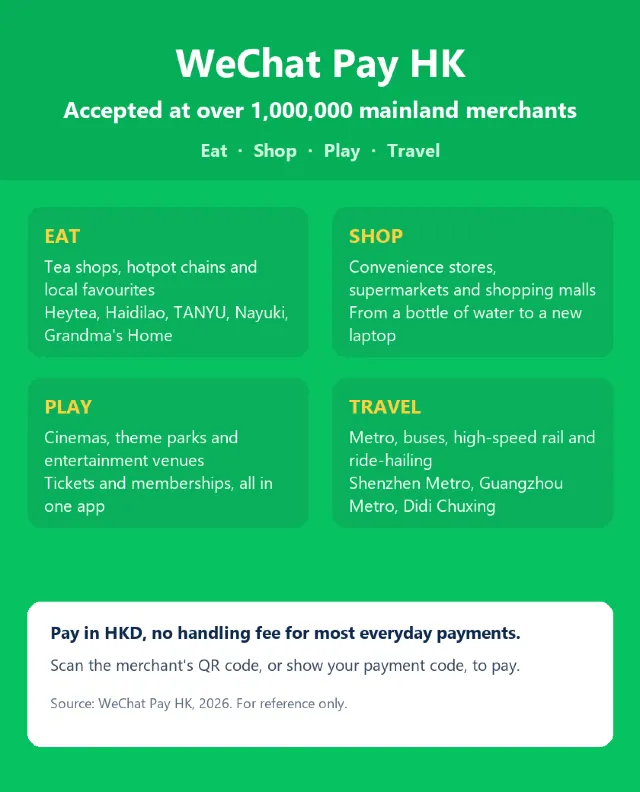
Two-way cross-border payments are already live on WeChat Pay HK. Use it directly at designated merchants in mainland China and you pay no transaction fee, at a preferential exchange rate, with the amount converted to Hong Kong dollars automatically. Although WeChat Pay HK is accepted only at designated mainland merchants for now, that network already covers more than one million of them, including Hong Kong favourites such as Heytea, Tanyu, Nayuki, Haidilao and Grandma's Home, as well as the Shenzhen Metro, Guangzhou Metro and Didi Chuxing.
Link a Hong Kong bank account or credit card
To activate WeChat Pay HK, first link a Hong Kong bank account or a Hong Kong credit card. Once that is done, you can pay in Hong Kong dollars locally and use WeChat Pay at online stores and retail shops.
| Link a Hong Kong bank account or credit card |
| Open WeChat, tap "Me", then select "Services" |
| Tap "Bank Cards" |
| Select "Add Bank Card/Add Bank Account" |
| Enter your Hong Kong bank card or credit card details |
| Set a dedicated payment password |
To use two-way cross-border payments and your WeChat Pay HK wallet in mainland China, you must complete identity verification first. Once verified, you can pay in Hong Kong dollars across the mainland with no extra transaction fee and exchange HKD for RMB at a preferential rate. Verification takes three steps: scan your HKID, confirm your details, then complete a face scan.
| WeChat Pay HK identity verification |
| Open WeChat, then go to "Me" → "Payment Management" → "Real-Name Authentication" |
| Select the correct nationality and scan your original Hong Kong identity card (HKID only) |
| Confirm your details and fill in your address |
| Scan your face (make sure the lighting is good) |
| Approval usually takes up to 7 business days, and the result is sent to you in WeChat |
| WeChat Pay HK top-up methods | |
| Credit card | Once your credit card is linked to WeChat Pay HK, you can pay with it directly, with no need to top up in advance. |
| Bank account transfer | If you linked a Hong Kong bank account when you opened the wallet and have completed identity verification, you can move money from that account into WeChat Pay HK as a top-up. |
| Cash top-up | If you have Hong Kong dollars in cash, you can top up at any 7-Eleven store: tap "Balance" in the Wallet section of WeChat Pay HK, select "Top Up", choose 7-Eleven and show the QR code to the cashier. |
For everyday spending in Hong Kong — shopping, riding the MTR or a bus, dining out — WeChat Pay HK is free of charge in most cases. Fees do apply to a few things, though: utility bills, cross-border remittances and payments made with certain credit cards.
Here is a summary of the latest WeChat Pay HK transaction fees:
| Transaction category | Payment method | Handling fee |
| Merchant payment | Balance/Bank account | No handling fee |
| Credit card (annual spending ≤ HK$200,000) | No handling fee | |
| Credit card (annual spending > HK$200,000) | 2.0% | |
| Utility payment | Balance/Bank account | No handling fee |
| Bank of China Visa / Mastercard | No handling fee | |
| UnionPay credit card / AEON | 1.0% | |
| Other credit cards | 1.5% | |
| Faster Payment System (FPS) / WeChat transfers / Red packets | Balance/Bank account | No handling fee |
| Bank of China credit card | 1.5% | |
| UnionPay credit cards | 1.5% | |
| Other credit cards | 2.5% | |
| Cross-border remittances (to mainland bank accounts) | Balance/Bank account | No transaction fee (up to HK$200,000 per year, shared with local FPS) |
| Bank of China credit card | 1.5% | |
| UnionPay credit cards | 1.5% | |
| Other credit cards | 2.5% |
*The fee information above is for reference only. Actual fees are subject to the latest official WeChat Pay HK announcement, and Trip.com is not responsible for any loss or dispute arising from changes to these fees.
WeChat Pay HK is now part of everyday life in Hong Kong. Whether you are travelling or shopping in Hong Kong, mainland China or Macau, it offers a fast, secure and affordable way to pay.
Here are the four main benefits at a glance:
As one of the payment apps Hongkongers know best, WeChat Pay HK does more than daily payments: from in-store spending to online shopping, from paying to getting paid — all in one app.

熱門文章

【深圳好去處2026】20間深圳商場推介!商場排名、深圳灣口岸附近商場一覽+交通攻略
 _TS***4m

【深圳按摩2026】21間港人桑拿揼骨推介|羅湖福田南山價錢交通
_TS***4m
深圳美食2026 12 間必吃深圳餐廳推薦:酸菜魚、椰子雞、海鮮、雞煲、火鍋全收錄
 Arrow Chan

【2026深圳景點】深圳怎樣玩?8個深圳景點推介
_TS***4m