
Planning a trip to Hong Kong? Leave the hassle of physical SIM cards behind! A Hong Kong eSIM provides you with instant 4G/5G coverage across virtually the entire territory.
Trip.com's eSIM plans connect you to Hong Kong’s top-tier networks, including CSL and 3HK. Whether you’re chasing the latest deals in bustling Causeway Bay, trekking the stunning Dragon’s Back trail, or exploring the tranquility of Lantau Island, you'll have uninterrupted, lightning-fast data.
Ready to Go Digital?
In this guide, we'll walk you through everything you need to know about purchasing and using a Hong Kong eSIM: how to choose the right plan for your itinerary, set it up instantly, and start using your data like a seasoned local!
- CountryHong Kong
- Package Option1GB/Day
- Duration3 Days
- PriceUSD 2.50
- CountryHong Kong
- Package Option1GB/Day
- Duration5 Days
- PriceUSD 3.50
- CountryHong Kong
- Package Option1GB/Day
- Duration7 Days
- PriceUSD 4.82
💡 What is the Hong Kong eSIM Exactly?
Think of the eSIM as your entirely digital SIM card—no physical plastic required! This technology is built 100% digitally into your smartphone (including the latest iPhones, Samsung Galaxy devices, and most new smartphones).
Instead of the tedious process of fiddling with tiny physical SIM cards at the airport, you can set up your complete Hong Kong data plan with just a few taps on your screen. It's essentially like downloading an app, but for your phone service!
How Does the HK eSIM Actually Work?
Getting your Hong Kong eSIM up and running is surprisingly simple and highly efficient.
When you purchase a HK eSIM on Trip.com, you will instantly receive a QR code via email. This code contains all your plan details: your data allowance, the validity period, and the necessary network settings.
You simply scan this QR code with your phone’s camera, and your device automatically downloads and installs the eSIM profile.
The Dual SIM Advantage:
The real convenience lies in your phone's capabilities. Your device can actually store multiple eSIM profiles and switch between them instantly. This means you can:
- Keep your home SIM active for receiving important calls and texts.
- Simultaneously use your Hong Kong eSIM for high-speed local data.
Plus, with Trip.com’s eSIM, you are automatically connected to the strongest available local network—eliminating the need for complicated manual network selection or manual setup processes.
 已出售16130
🆚 Which is Best for Hong Kong? eSIM, SIM Card, or Wi-Fi Router
Looking for the most reliable way to get online during your travels? As travel experts, we break down your options to help you choose the connection that truly makes sense for your Hong Kong itinerary.
The eSIM, the physical SIM card, and the Pocket Wi-Fi router are the three major means to connect to the Internet abroad. Below, you can find a clear comparison to guide your decision for your Hong Kong trip:
Feature | Hong Kong eSIM | Hong Kong SIM Card | Hong Kong Pocket Wi-Fi |
Key Advantages | • Perfect if you dislike handling physical cards • Works instantly upon landing • Often the cheapest data-only option | • Provides a local Hong Kong phone number • Works with most older phone models | • Allows internet sharing with groups/family • Connects multiple devices simultaneously • No phone compatibility issues |
Important Considerations | • Compatibility is limited to newer smartphones • Does NOT provide a local phone number | • Requires manual setup (PIN, activation) • Requires an unlocked (SIM-free) phone | • Battery life concerns (must be charged) • Difficulty receiving/making calls (requires VoIP app) |
Best Suited For | Travelers with newer smartphones who prioritize a cheap, instant, and reliable data connection. | Travelers who specifically require a local phone number and don't mind the manual setup process. | Group travelers or those who need to connect multiple devices simultaneously (e.g., tablet, laptop). |
The Verdict: Why Travelers Choose eSIM
Based on current trends, most modern travelers are opting for the eSIM—especially those with newer phones. Why? It's simply easier and faster!
You can set up your data plan instantly before you even leave home, and your connection is live the moment you land in Hong Kong. This eliminates the need to hunt for SIM card shops at the airport or deal with potential language barriers.
If you are planning a trip to Hong Kong, the Trip.com HK eSIM is definitively recommended for its fast, reliable connection and highly competitive rates!
🥇 Top Providers: The Best Hong Kong eSIMs Comparison
When selecting the best eSIM for your journey, price, data allowance, and network reliability are paramount. We've compiled the leading options to help you choose the best value for your trip.
Trip.com Hong Kong eSIM: The Unbeatable Value Pick
Our plans are consistently rated as the most cost-effective option for travelers seeking reliable data without the high price tag.
Plan Duration | Daily Data Allowance | Price (USD) | Price per Day (Avg.) |
1 Day | 1GB/day | $1.31 | $1.31 |
2 Days | 1GB/day | $1.64 | $0.82 |
3 Days | 1GB/day | $1.84 | $0.61 |
4 Days | 1GB/day | $2.11 | $0.53 |
5 Days | 1GB/day | $2.39 | $0.48 |
7 Days | 1GB/day | $2.60 | $0.37 |
Why travelers choose Trip.com:
- Unrivaled Price: Our 7-day plan works out to just cents per day, making it significantly cheaper than most competitors.
- Flexible Data Tiers: Choose plans from 1 to 7 days, with options for 1GB or 2GB of high-speed data per day. The data allowance resets daily—perfect for heavy users!
- Effortless Top-Ups: Easily extend your connectivity by topping up your plan directly if your trip is extended.
- Best-in-Class Support: Enjoy peace of mind with our dedicated 24/7 support team, ready to assist with setup or troubleshooting at any hour.
Trip.com Exclusive: Get high-speed HK eSIM coverage starting from just $1.31 USD!
Other Leading eSIM Competitors in Hong Kong
MobiMatter (via 3HK Network)
MobiMatter offers competitive packages, often including a local Hong Kong phone number for calls, making them ideal for long-term stays or business travelers who require voice minutes.
Data Plan | Validity | Price (USD) | Key Features |
1GB | 7 days | $3.99 | Data only (Higher price point than Trip.com) |
12GB | 30 days | $15.99 | Includes 2,000 voice minutes & a local number (+852) |
36GB | 30 days | $31.99 | Includes 5,000 voice minutes & a local number |
Holafly HK eSIM
Holafly focuses on the unlimited data market, appealing to extreme data users like streamers and remote workers.
Data Plan | Validity | Price (USD) | Key Feature |
Unlimited Data | 5 days | $19.00 | Includes 500MB daily hotspot allowance (subject to Fair Usage Policy). |
Unlimited Data | 7 days | $27.00 | Uses the Three HK network for coverage. |
Nomad Hong Kong eSIM
Nomad offers data-only plans over the HKT (CSL) and China Mobile HK networks, providing users with the flexibility to switch between available networks for better signal strength.
Data Plan | Validity | Price (USD) | Price per GB (Approx.) |
1GB | 7 days | $6.00 | $6.00 |
10GB | 30 days | $18.00 | $1.80 |
Note: Nomad's plans are typically finite data packages over a longer duration, which may lead to a limited daily data allowance that might not fully satisfy heavy internet users.
Airalo HK eSIM
As a global pioneer in the eSIM space, Airalo is known for its wide coverage but tends to be priced slightly higher for Hong Kong packages, making it less ideal for budget-conscious travelers with heavy data needs.
Data Plan | Validity | Price (USD) | Price per GB (Approx.) |
1GB | 7 days | $4.50 | $4.50 |
10GB | 30 days | $19.00 | $1.90 |
✅ 5-Step Guide to Set Up Your Hong Kong eSIM
Activating your Trip.com Hong Kong eSIM is fast and simple. Follow these five essential steps to ensure you’re connected the moment you land.

STEP 1: Check Your Smartphone’s eSIM Compatibility
Before purchasing, verify that your device supports eSIM technology.
Operating System | How to Check | Key Indicator |
iPhone (iOS) | Go to Settings → General → About. Check the "Carrier Lock" status (must be "No SIM restrictions") and look for the EID number. | Dial *#06#: If an EID number appears, your phone is eSIM compatible. |
Android | Go to Settings → Connections → SIM card manager. Look for the option to "Add mobile plan" or "Add eSIM." | Dial *#06#: If an EID number appears, your phone is eSIM compatible. |
STEP 2: Choose Your Ideal Hong Kong eSIM Plan
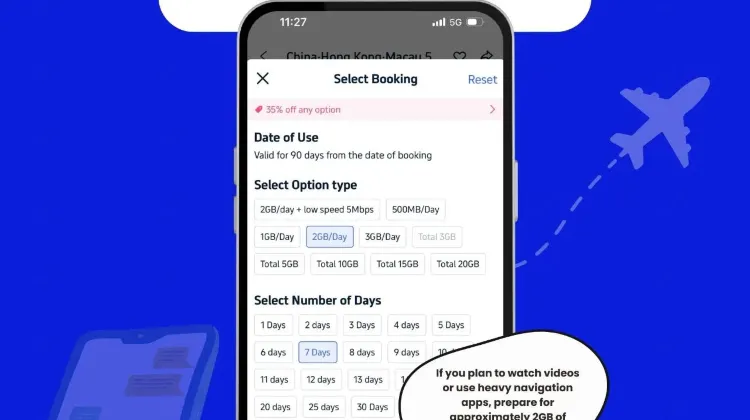
Select a data plan on Trip.com that perfectly matches the length and demands of your trip.
- Duration: For a 2-night, 3-day trip, a 3-day plan is recommended.
- Data Capacity: Always choose a plan with sufficient daily data (e.g., 2GB per day) if you plan on heavy usage like video streaming or frequent video calls.
STEP 3: Receive Your Activation QR Code
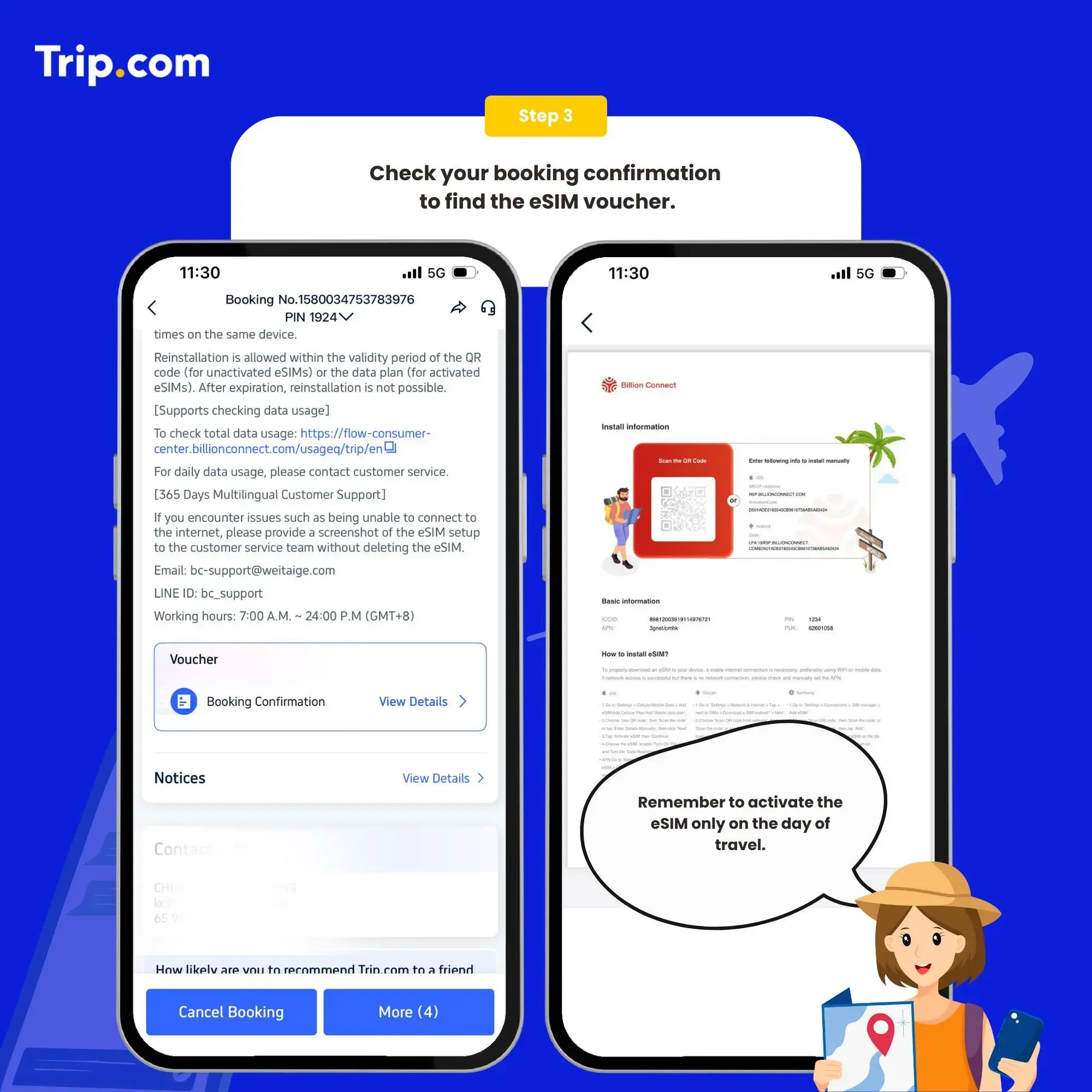
Once you complete the purchase on Trip.com:
- Crucial: Carefully fill in your contact information, especially the email address used to receive the installation QR code.
- You will receive the QR code instantly via email.
⚠️ IMPORTANT WARNING: Triple-check your email address during checkout. The QR code cannot be reused if the installation fails due to a user error or if the profile is accidentally deleted.
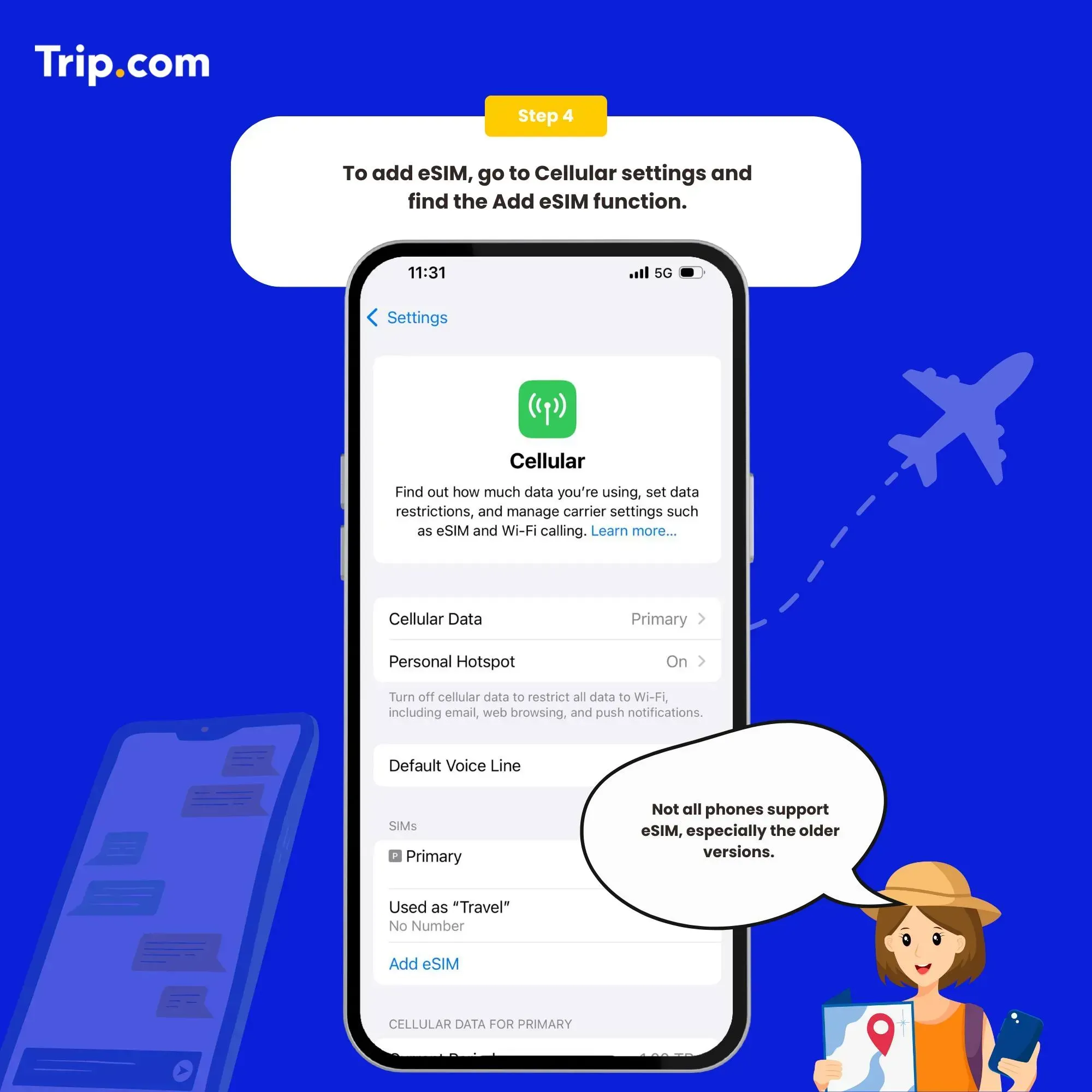
STEP 4: Install the eSIM Profile on Your Device
You must be connected to Wi-Fi to perform this step. Use a stable Wi-Fi connection (like your home Wi-Fi) to install the profile before you leave for Hong Kong.
System | Installation Path |
iPhone (iOS) | Settings → Cellular (or Mobile Data) → Add eSIM → Use QR Code. |
Android | Settings → Connections → SIM Card Manager → Add Mobile Plan → Scan QR Code. |
- Scan the QR code received in your email.
- Follow the on-screen prompts to confirm and download the plan (the plan name may show as "Welcome to Billion Connect!" or a similar name).
- Designate your new eSIM line as the "Mobile Data" line (keep your home SIM as the default for calls if needed).
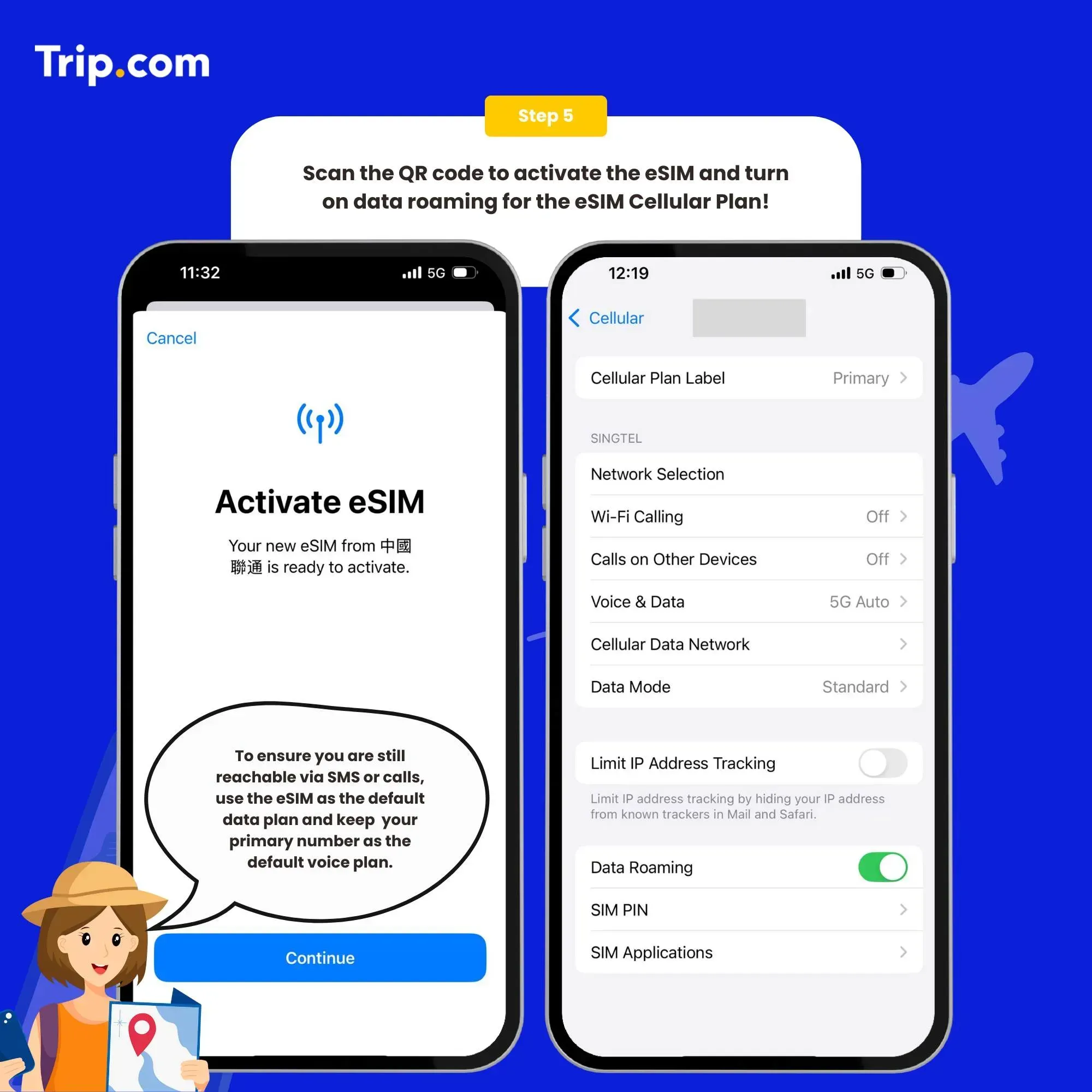
STEP 5: Activate Data Roaming Upon Arrival
This final step connects you to the local network in Hong Kong.
- When you land at the airport in Hong Kong, go to Settings.
- Select your new eSIM profile.
- Toggle "Data Roaming" to ON.
- Within moments, your device will connect to the local network and display the carrier name (e.g., CSL or 3HK).
💡 Troubleshooting Tip: If you cannot connect immediately, try toggling Airplane Mode ON and OFF to force the phone to search for the local network. If issues persist, check the APN settings (usually found under Mobile Data Network or Access Point Names).
🏆 Why Choose Trip.com for Your eSIM? (Top 3 Reasons)
When securing connectivity for your overseas journey, Trip.com offers unparalleled flexibility, reliability, and support. Here are the top three reasons to choose us for your next eSIM purchase:
1. Unmatched Flexibility: A Plan for Every Traveler
Trip.com provides an extensive range of eSIM products, ensuring you find a plan that perfectly matches your trip duration and data consumption habits.
- Flexible Options: Our plans can be tailored to your stay, offering varying validity periods and data capacities.
- Diverse Data Packages: Whether you are a heavy user who needs Unlimited Data or a budget-conscious traveler opting for a Limited Data plan, we have a solution for you—from 500MB up to 30GB packages.
2. Trusted Performance: Highly Rated by Travelers
Trip.com’s eSIM products consistently receive widespread praise for their affordability, fast network speeds, and strong reliability.
- User Satisfaction: Travelers frequently highlight the convenience of freely selecting data volumes and duration based on their actual needs, ensuring they never waste unused data.
- Instant Activation: Our eSIMs satisfy users with their instant-use feature. You can switch to the required carrier or plan immediately via your phone settings, eliminating the time and trouble of carrying and swapping physical cards.
- Quality Assurance: Users confirm that the card quality and service are excellent, emphasizing that our offerings are genuine and highly affordable—a true value for money.
3. Dedicated Support: 24/7 Customer Service Standby
Travel can be unpredictable, but your connectivity support doesn't have to be.
Trip.com is confident in addressing sudden issues with our professional customer support team, which is on 24/7 standby to provide assistance and solutions for any question you may have. We offer multilingual support, including Cantonese, English, Korean, and several other languages, ensuring reliable help is always just a call or chat away.
✈️ The Pros and Cons of Using eSIM Technology
To help you make a fully informed decision, here are the key advantages and potential drawbacks of using an eSIM for your trip:
Three Key Advantages of Using an eSIM
Advantage | Benefit to the Traveler |
1. Instant Connectivity Upon Arrival | Unlike traditional SIM cards, which require purchasing at the airport and fiddling with installation, an eSIM is downloaded before you leave, ensuring you connect smoothly the moment your plane lands, saving precious travel time. |
2. Zero Risk of Loss or Damage | Traditional physical SIM cards are tiny and easily lost or damaged when using the ejector pin. Since the eSIM is embedded digitally in your device, there is no risk of misplacing or destroying a physical card during transit. |
3. Dual SIM Functionality | Even on a single-SIM device, an eSIM enables "one machine, two numbers." You can keep your primary number active (to receive SMS/calls) while using the eSIM solely for data, offering maximum convenience while abroad. |
Three Potential Disadvantages of Using an eSIM
Disadvantage | Consideration for the Traveler |
1. Limited Device Compatibility | eSIMs require a compatible phone or tablet. While most new flagship models (iPhone, Samsung, Sony, Google Pixel) support it, older models or some budget-friendly devices do not. |
2. Device Locking | Since the eSIM is embedded to the device, it is difficult to easily move the profile between multiple devices (e.g., sharing the card between two different phones). |
3. Lack of Local Phone Number | Most data-only eSIM plans do not come with a local phone number (required for booking restaurants or calling local services). This feature usually requires a separate purchase or a physical SIM card. |
Top Hong Kong Hotel Recommendations
Top Hong Kong Hotel Recommendations
5星級
商務出差
家庭出遊
溫泉
健身房
游泳池
包括早餐
Practical FAQs: Using Your Hong Kong eSIM
Can I use the eSIM in places other than where I purchased the plan?
You can install the eSIM profile from anywhere, but you cannot use the data plan until you arrive at your intended destination (Hong Kong).
If you install the eSIM before leaving home, make sure the eSIM line is turned OFF in your phone settings. Only switch the line ON (activate data roaming) once you have officially landed in Hong Kong to prevent premature plan activation or unexpected charges.What kind of communication speed can I expect in Hong Kong?
Hong Kong boasts one of the world's most advanced communication infrastructures. Travelers using a quality eSIM plan can expect high-speed and stable 4G/5G connectivity.
You will generally experience a comfortable communication environment for all common activities, including web browsing, streaming, navigation (maps), and data communication.Can I use the same eSIM on another device while traveling in Hong Kong?
No, this is generally not possible.
Unlike a physical SIM card, an eSIM profile is digitally embedded and locked to the device on which it was first installed. Once the QR code is used and the profile is installed on your smartphone, it cannot be easily transferred or moved to another device. If you need connectivity for a secondary device (e.g., a tablet), you would need to purchase a separate eSIM or utilize the hotspot feature (if included in your plan).